
Update Validator Commission
Below are detailed instructions for creating and running a Node.js script to update the validator commission on the Root Network. Below are some important things to keep in mind:
- Commission values are in parts per billion (ppb)
- Example conversions:
- 0.75% = 7,500,000 ppb
- 10% = 100,000,000 ppb
- Double-check your commission values before submitting
- Keep your validator keys secure
Using Node.js Script
- Create a new Node.js project and install dependencies:
npm install @polkadot/api @polkadot/keyring @polkadot/util @therootnetwork/api- Create a script file (e.g.,
update-commission.js) with the code below:
javascript
const { Keyring } = require("@polkadot/keyring");
const { hexToU8a } = require("@polkadot/util");
const { ApiPromise } = require("@polkadot/api");
const { getApiOptions, getPublicProvider } = require("@therootnetwork/api");

async function updateCommission(validatorKey, commissionPPB) {
    try {
        // Initialize API
        const api = await ApiPromise.create({
            ...getApiOptions(),
            ...getPublicProvider("root"),
        });

        // Initialize keyring
        const keyring = new Keyring({ type: "ethereum" });
        const validator = keyring.addFromSeed(hexToU8a(validatorKey));

        // Create commission update call
        const call = api.tx.staking.validate({
            commission: commissionPPB,
            blocked: false
        });

        const setCommission = api.tx.futurepass.proxyExtrinsic(
            "0xfffFfFFf00000000000000000000000000040F95",
            call
        );

        // Send transaction
        const txHash = await setCommission.signAndSend(validator);
        console.log(`Transaction submitted with hash: ${txHash}`);

        // Wait for confirmation
        await new Promise(resolve => setTimeout(resolve, 5000));
        console.log("Please verify the commission update on the Root Network Portal");

    } catch (error) {
        console.error("Error updating commission:", error);
    }
}

// Example usage (replace with your values)
// updateCommission('YOUR_VALIDATOR_KEY', 7500000); // For 0.75% commission
Using the Root Network Portal
Option 1 - Update Using Extrinsics
- Go to the Root Network Portal and sign in with your Metamask wallet. Ensure your accounts and Root Balances are visible under the Accounts section. If not, troubleshoot your Metamask connection.

- Navigate to the Extrinsics page and set up the commission update call like so:
- In the first dropdown, select
futurepass - Select
proxyExtrinsic(futurepass, call) - Under the FuturePass account, verify it shows:
FFFF..0F95 - For the call selection:
- Select
staking - Choose
validate(prefs) - Enter your commission value in ppb format (e.g., 7500000 for 0.75%)
- Set
blockedto "No"
- Select
- In the first dropdown, select
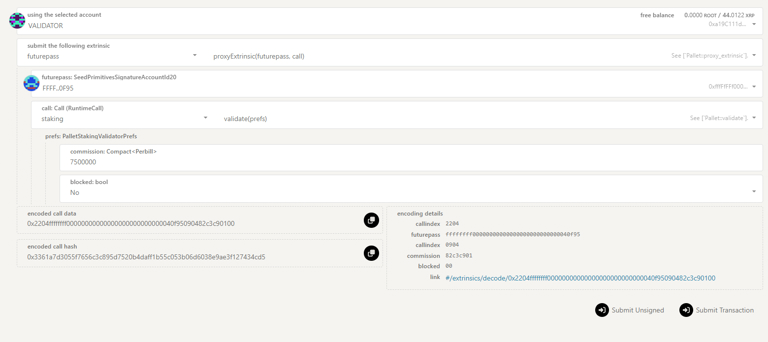
- Review the encoded call data and hash that appear at the bottom of the form.
- Click Submit Transaction to proceed with the update.
- Sign the transaction with MetaMask when prompted.
- Wait for confirmation of the transaction.
Note
Important Notes:
- Double-check your commission value is in ppb format before submitting
- Verify all nested selections are correct before proceeding
Option 2 - Change Validator Preferences
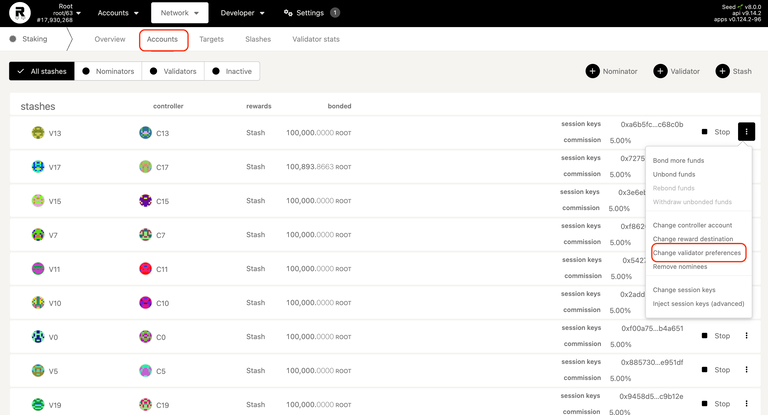
- Go to the Portal Extrinsics page and choose Network > Staking from the drop-down menu.
- Select the Accounts tab.
- Locate your stash account option and choose Change validator preferences. validator-commission
- On the Set Validator Preferences page, enter your commission value in the Reward Commission Percentage field. Example: For 0.75%, enter
0.75.
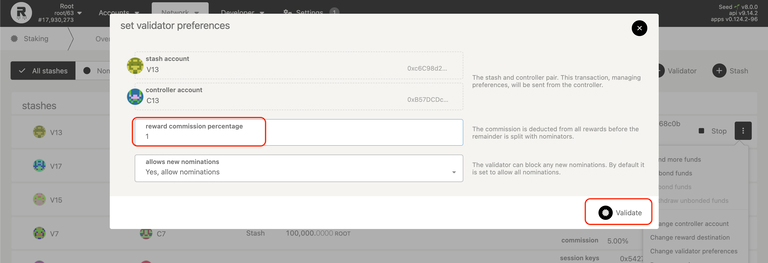
- Click Validate to confirm and submit the request.
Source: https://docs.therootnetwork.com/participate/validator-guide/update-validator-commission · captured 2026-05-16 · part of TRN Docs source map